ludus

Table of Contents
In offensive security the ability to test out attacks in a lab is invaluable - knowing that you’re going to see a certain piece of software, OS, or networking configuration, having a place to test out TTPs is the best type of preparation you can do. Ludus is a self-hostable cyber range built on Proxmox, Ansible and Packer. It helps to automate one of the most tedious aspects of security, deploying testing environments. One of the best things about Ludus is that it’s an overlay on Proxmox, not a replacement. This means that any Ludus range is still a completely viable Proxmox machine for other workloads. Personally I like to run Ludus on its own system if possible in order to separate production systems and ranges.
The documentation for Ludus is really well done. I’ve managed a few different instances of Ludus and frequently use it for reference. Even the stuff that’s not explicitly in the docs can be inferred from what is there. The discord chat for Ludus is also an incredible resource, I’ve gotten some help from there as well.
Because Ludus is built partially on Ansible, there are a plethora of Ansible roles you can use to include various configurations into your range including: mythic C2 deployment, elastic edr, active directory vulns, etc. There are also preconfigured vulnerable environments available to deploy, alter, and attack including the GOAD (Game of Active Directory) project.
networking⌗
The networking configured in Ludus is really clever. The Proxmox server also acts as a WireGuard server and grants access to some shared resources if deployed (ie a fileshare server that’s accessible to all ranges and users) as well as thier own range and shared ranges. Each user gets a Linux bridge which acts as a virtual switch. The machines deployed by the user for their range then get assigned that bridge as their network device and the router within that range manages the traffic within the range. Here’s a network diagram of what Ludus does under the hood:
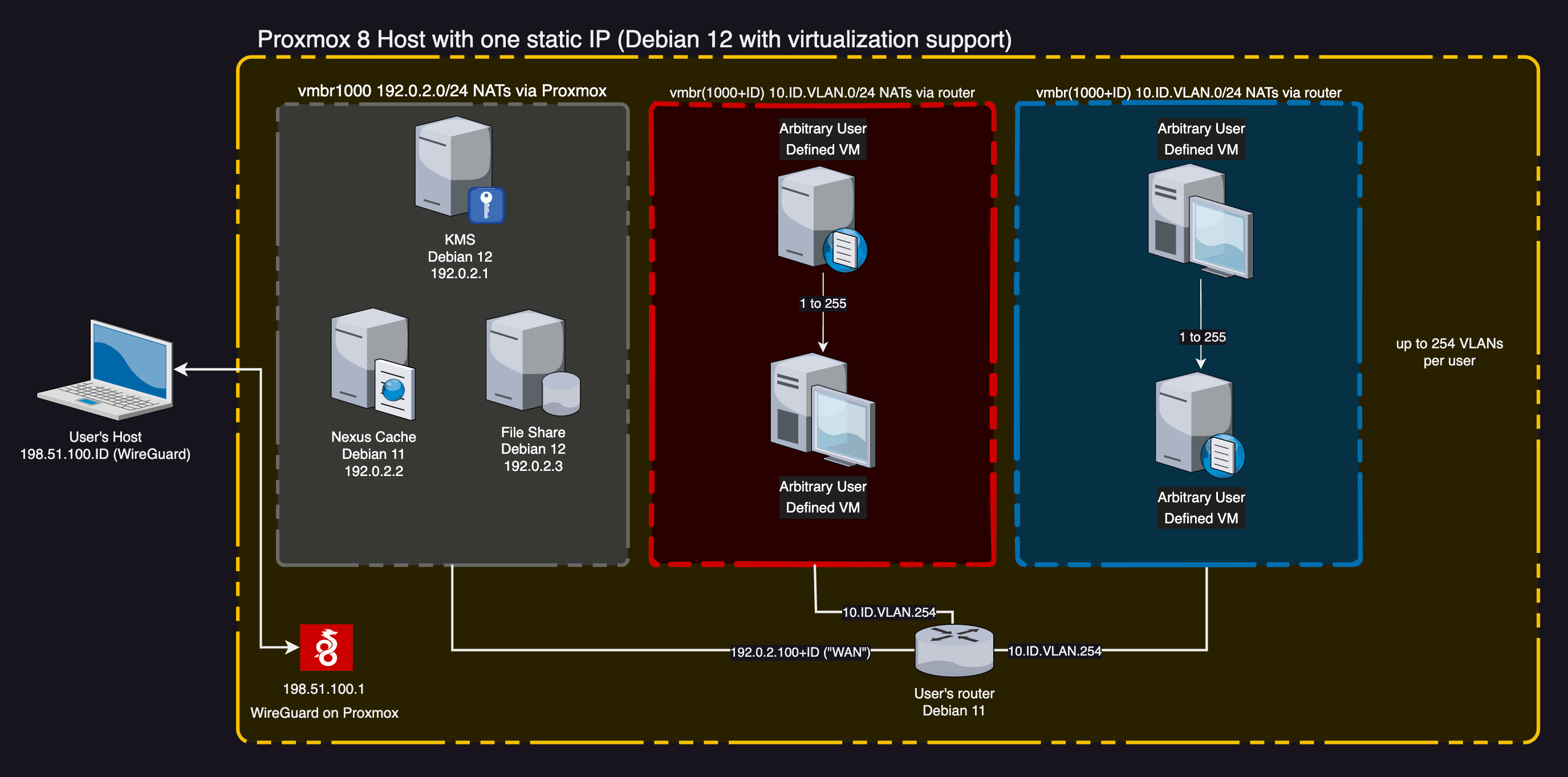
With this networking setup, Ludus is able to provide another really cool feature called testing mode. In testing mode, a user’s range is cut off from the internet but not from other machines within the range and not from the user via WireGuard. A snapshot is taken of every system in a range before testing mode and when the range gets taken out of testing it rolls back to the snapshot before testing was enabled. This is an incredible setup for both malware development and malware analysis, although additional precautions should be taken for the latter.
This isn’t an extensive examination of all the features of Ludus when it comes to networking. These are just some of the features I think are interesting. For more information on Ludus’ networking configuration, see the networking documentation.
use cases⌗
I’ve deployed a few different Ludus ranges for different use cases. The primary use case I have with Ludus is deploying GOAD environments and attacking active directory. As mentioned before you can deploy something like elastic edr into the range in order to try more evasive testing which is a great way to build up the skillset. I’ve started tinkering with malware development as well. I’ve configured a range with a windows box for the development (with MS Defender disabled ) and then one for the testing (with MS Defender enabled) and the workflow with that is really smooth and adding on testing mode makes it easy to avoid uploading signatures and things of that nature.
final thoughts⌗
There’s a lot of things to like about Ludus. The self-hosted nature of it, built on solid automation tooling, the ease of community contributions, the list goes on and on. But the best thing is that it lowers the barrier to entry into such a complicated field. I remember having to manually set up Active Directory environments for testing when I was first starting out in offensive security. While doing the deployment a few times is good to understand the process, after the 10th time it gets tedious. This project saves so much time and simplifies lab configuration into IaC which is a truly incredible thing. And while it’s recommended to have a decent amount of resources, you can scale your range down to what meets your needs. A domain controller and client should be able to run even on low end hardware. So give Ludus a try!